
How to Choose the Best NFC Smart Door Lock?

Choosing the best NFC Smart Door Lock means looking beyond a sleek keypad or a quick tap. A reliable lock should work with your phone, provide clear access controls, and fit your door without awkward gaps around the strike plate. Bruce Schneier, a respected security technologist, offers a useful reminder: “Security is a process, not a product.” That applies here. A lock’s convenience matters, but so do setup, updates, and everyday habits.

Start by checking which phones and NFC standards the lock supports. Confirm whether access works when your phone battery is low, and whether the lock offers a backup method, such as a keypad or physical key. Small details matter. Check the battery life, low-battery alerts, and how credentials can be removed when a phone is lost. Test it twice. Also review the manufacturer’s support options and update history; polished product photos cannot answer those questions.

Think about the people who will use the door. A family may need separate permissions, while a rental host may value temporary access and a useful entry log. Make sure installation suits your door thickness and existing hardware. I would not assume that NFC alone makes a lock secure; the full design and maintenance matter. Convenience has limits. The best choice is the one that fits your entry, your devices, and your willingness to manage it—not simply the model with the most features.
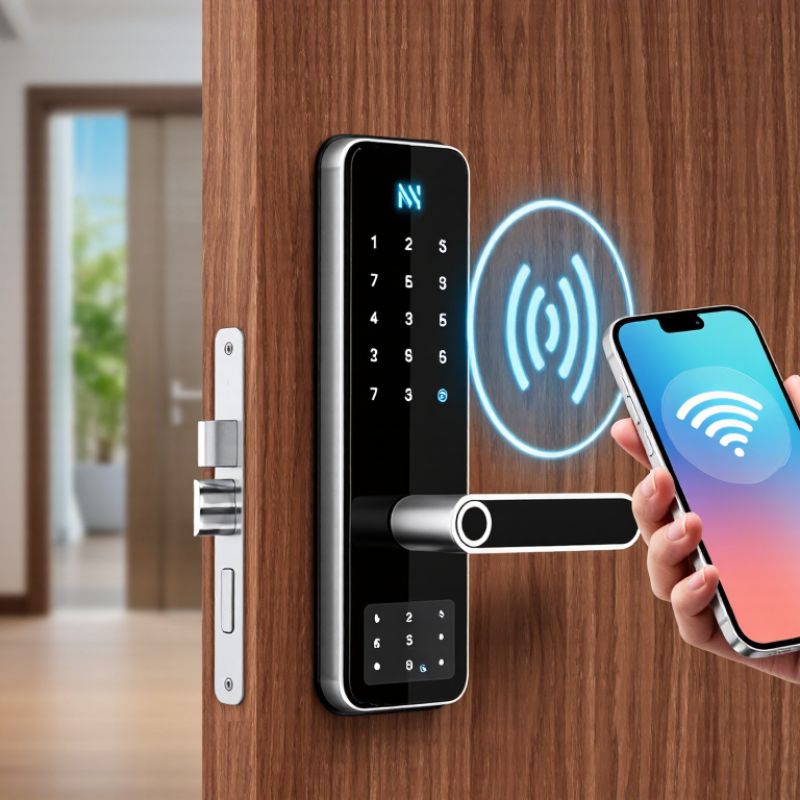
How to Choose the Best NFC Smart Door Lock?

Understand How NFC Smart Door Locks Work

An NFC smart door lock reads a credential held very close to its reader, usually within a few centimeters. The reader creates a short-range electromagnetic field, allowing a compatible phone or access card to exchange data. The lock checks that credential against its stored permissions. If it is valid, a small motor moves the bolt or latch. The action is quick.

Some models verify credentials directly on the lock, while others use a connected service for setup or activity records. NFC access generally does not need an active internet connection at the door, but remote features may. Check how credentials are added, removed, and updated. A lost phone should be revocable without replacing the lock. Battery condition matters, too; a low-battery warning is easy to ignore until the motor sounds sluggish. I would test the backup entry method before relying on the lock every day.

Tips: Hold the phone near the marked reader, then pause briefly. Confirm the door is fully latched after entry. Check battery alerts and test the mechanical key or other backup occasionally. Small details, but they prevent frustrating surprises.

Identify Your Access Needs and Door Compatibility

How to Choose the Best NFC Smart Door Lock?

Identify Your Access Needs and Door Compatibility

Start by listing who needs access and how often. A household may need phone access for adults, while children or visitors may find NFC cards simpler. Check whether the lock supports the phones, cards, or other credentials you plan to use. NFC availability alone does not guarantee every phone or wallet will work. Keep it practical. Consider what happens when a phone battery dies, and choose a backup entry method you can use reliably.

Next, inspect the door before comparing models. Note its thickness, material, opening direction, and the position of the existing latch or deadbolt. Measure carefully, then compare those details with the lock’s installation requirements. A lock designed for one latch spacing may not fit another. Small mismatch, big hassle. If the door has a narrow frame, unusual hardware, or a multi-point locking system, confirm compatibility with the manufacturer’s specifications or a qualified installer.

Think about daily routines, too. Will you need temporary access for a cleaner or a relative? Can permissions be removed easily when they are no longer needed? Check how the lock handles lost credentials and low battery warnings. These details matter more than a long feature list. A choice can still feel uncertain until you check the measurements twice. That is worth doing.

How to Choose the Best NFC Smart Door Lock? — Identify Your Access Needs and Door Compatibility
Decision Factor What to Identify Compatibility Check Best-Fit Guidance
Who needs access? List regular household members, temporary visitors, cleaners, or other authorized users. Check how many NFC credentials the lock supports and whether credentials can be added, removed, or time-limited. Choose a system with enough manageable credentials for your household and a straightforward way to revoke lost or unused access.
How will people unlock the door? Decide whether NFC will be the main method or one option alongside a keypad, physical key, or app. Confirm which credential types are supported. Phone-based NFC access depends on the lock, device, operating system, and regional availability. For varied users or occasional phone battery issues, consider a lock with a clearly documented backup entry method.
Phone or card credentials Determine whether users prefer a compatible phone, a physical NFC card or fob, or both. Check supported phones and credential formats in the product specifications; NFC compatibility alone does not guarantee that every phone can be used as a key. If users have different devices, confirm compatibility before purchase and consider whether the lock supports separate physical credentials.
Existing lock type Identify whether the door has a standard deadbolt, a mortise lock, a multipoint mechanism, or another type of hardware. Compare the existing lock and door preparation with the installation requirements. Many smart deadbolts are not direct replacements for mortise or multipoint locks. Choose a lock explicitly designed for the existing mechanism, or plan for a compatible replacement and professional installation.
Door dimensions Measure door thickness and the distances from the door edge to the lock center and from the lock center to nearby edges. Compare every measurement with the specific lock’s installation template and stated supported ranges; dimensions vary by model. Do not rely on appearance alone. Confirm the measurements before ordering, especially for older or non-standard doors.
Door and frame alignment Check that the door closes smoothly and that the bolt moves freely into the strike plate. A smart lock may not operate reliably if the door is sagging, the bolt binds, or the strike plate is misaligned. Correct alignment problems before installation; motorized locks need the bolt path to move without excessive resistance.
Door handing and handle setup Note which side the hinges are on and whether the door opens inward or outward. Check whether the lock supports the door’s handing and whether its interior hardware will clear nearby trim, handles, or glass panels. Verify the installation instructions for your exact door orientation and available space on both sides of the door.
Indoor or outdoor exposure Consider rain, direct sunlight, humidity, and temperature at the installation location. Check the lock’s stated environmental limits and whether the exterior reader is suitable for the door’s exposure. For exposed entrances, select a model rated for the expected conditions and follow its installation guidance for weather protection.
Power and backup entry Decide how you will handle low batteries, a depleted phone, or a temporary power issue. Check the battery type, low-battery alerts, emergency power procedure, and whether a physical key or other backup is available. Choose a backup method you can access when your phone is unavailable, and keep spare batteries according to the manufacturer’s guidance.
Connectivity and remote features Decide whether local NFC access is sufficient or whether you also need remote status, alerts, or access management. Remote features may require a compatible hub, network connection, app, or subscription. NFC unlocking and internet connectivity are separate functions. Check what works locally without internet and what additional equipment or services are needed for remote functions.

Compare NFC Credentials and Backup Entry Methods

NFC credentials make entry quick: tap a phone or card, then hear the bolt retract. A card is simple to share, but losing it may require revoking access. A phone can be easier to manage, yet a dead battery or disabled NFC can leave you outside. Check whether the lock supports secure credential revocation and works with your phone’s case. Small details matter. ABI Research, in a forecast cited by the NFC Forum, projected NFC-enabled device shipments to grow from 4.2 billion in 2023 to 6.2 billion in 2028. That signals broad device support, not a guarantee that every phone will work with every lock.

Backup entry should solve a real failure, not create another weak point. A PIN keypad can help when your phone is charging indoors, but choose a model that limits repeated guesses. A physical key offers another route; keep it somewhere accessible but not beside the door. Some locks also accept emergency power through exterior contacts. Test that method before you need it. I still find backup plans easy to overlook. Check what happens during a power failure, a lost phone, or a network outage, and make sure a trusted household member can enter without borrowing your credentials.

How to Choose an NFC Smart Door Lock: Credentials and Backup Entry

Phone and internet dependence by entry method

The chart shows typical requirements: 1 means required and 0 means not required. An NFC card, PIN, or physical key can provide a phone-free backup. Local NFC and Bluetooth entry can often work without internet when credentials are stored on the lock; exact behavior depends on the model and setup.

Evaluate Security, Privacy, Power, and Installation

How to Choose the Best NFC Smart Door Lock?

Security starts with more than a tap. Check whether the lock protects stored credentials and supports access codes or cards you can revoke. A lost phone should not mean a lost key forever. Look for clear lock-status alerts and a mechanical backup. Test that backup before relying on it. Also consider who can view entry records, and whether the lock stores them locally or online.

Privacy deserves a close read. Some locks collect access times, user details, or device information. Review what is recorded, who can access it, and how long it remains available. Keep permissions limited to what the lock needs. A convenient app may request more than expected. I would not assume that “smart” automatically means private; the settings can be easy to overlook.

Power and installation affect everyday reliability. Check the battery type, low-power warning, and backup method before purchase. Battery life varies with use, temperature, and connected features. Keep spare batteries where you can find them. Measure your door thickness and backset, then compare them with the lock’s requirements. A slightly misaligned latch can cause repeated failures, even with good electronics. Test the door by hand after installation, and confirm the bolt moves freely. Some details are easy to miss. A careful fit matters as much as the app.

Choose a Lock Based on Reliability and Total Cost

A reliable NFC smart door lock should respond consistently, not just look polished in a product photo. Check published information about testing, warranty coverage, and expected battery life. Ask whether it warns you before power runs low and offers a practical backup method, such as an emergency power connection or mechanical key. Small details matter. A reader that struggles through a thick phone case or requires precise tapping can become irritating during a rainy evening. Also confirm that the lock fits your door thickness, latch, and existing bore holes; an incompatible door can turn a low-cost purchase into an installation expense.

Compare the total cost over several years, not only the checkout price. Include installation, replacement batteries, optional access cards, and any paid app features you genuinely need. A cheaper lock may cost more if its batteries drain quickly or its support is difficult to reach. Review how access permissions are managed, whether software updates are provided, and what happens if your phone is lost. These details affect daily reliability as much as the NFC reader itself. I would still leave room for doubt: advertised battery life depends on usage, temperature, and door alignment, so real results can vary. Look for clear test conditions rather than relying on one impressive number.

Article Source:

dLED: retail LED lighting
Privacy Overview

This website uses cookies so that we can provide you with the best user experience possible. Cookie information is stored in your browser and performs functions such as recognising you when you return to our website and helping our team to understand which sections of the website you find most interesting and useful.